

在WorkFine是支持富文本功能的,本文提供一些典型富文本样式,兼容WorkFine直接复制粘贴使用。
📺 WorkFine内使用富文本的方法
仿大厂样式
当然可以!下面为你精心设计 8 款模仿主流科技大站风格 的「左侧带竖线」静态标题样式,灵感来源于:
- Apple(极简克制)
- Google / Material Design(清晰层次)
- Microsoft Fluent(柔和现代)
- GitHub(开发者友好)
- Notion(内容优先)
- Stripe(高质感 UI)
- Vercel / Next.js(开发者美学)
- Linear(精致效率工具)
所有样式均使用 纯内联 CSS + <div>,无标题标签、无 JS、无外部依赖,可直接粘贴到富文本编辑器中使用。
🍏 1. Apple 风格 · 极简克制

<div style="
  font-size: 28px;
  font-weight: 600;
  color: #1d1d1f;
  padding-left: 12px;
  border-left: 2px solid #007aff;
  margin: 1.4em 0;
  font-family: -apple-system, BlinkMacSystemFont, 'Segoe UI', sans-serif;
  letter-spacing: -0.02em;
">创新由此开始</div>
特点:细蓝线、紧凑字距、系统字体,干净如 macOS 设置页。
🔵 2. Google / Material 风格 · 清晰层级

<div style="
  font-size: 24px;
  font-weight: 500;
  color: #202124;
  padding: 8px 0 8px 16px;
  border-left: 4px solid #1a73e8;
  margin: 1.2em 0;
  font-family: 'Google Sans', 'Roboto', Arial, sans-serif;
">智能服务已启用</div>
特点:Google 蓝、明确留白、专业文档感。
💠 3. Microsoft Fluent 风格 · 柔和现代
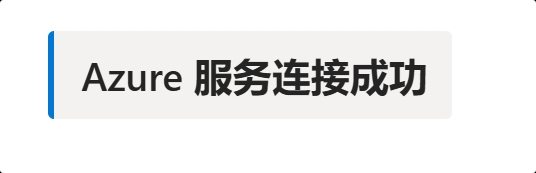
<div style="
  font-size: 26px;
  font-weight: 600;
  color: #242424;
  background: #f3f2f1;
  padding: 12px 16px 12px 18px;
  border-left: 4px solid #0078d4;
  margin: 1.3em 0;
  font-family: 'Segoe UI', system-ui, sans-serif;
  border-radius: 4px;
">Azure 服务连接成功</div>
特点:浅灰底 + 圆角 + 微软蓝,Office/Teams 同款质感。
⚙️ 4. GitHub 风格 · 开发者友好
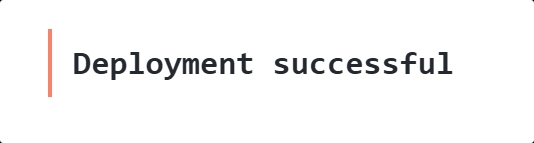
<div style="
  font-size: 22px;
  font-weight: 600;
  color: #24292f;
  padding: 10px 0 10px 14px;
  border-left: 3px solid #f9826c;
  margin: 1.2em 0;
  font-family: 'SFMono-Regular', Consolas, 'Liberation Mono', monospace;
">Deployment successful</div>
特点:等宽字体 + GitHub 红(用于状态提示),像 Actions 日志标题。
📝 5. Notion 风格 · 内容优先

<div style="
  font-size: 24px;
  font-weight: 600;
  color: #37352f;
  padding-left: 12px;
  border-left: 3px solid #5669ff;
  margin: 1.2em 0;
  font-family: ui-sans-serif, system-ui, -apple-system, sans-serif;
  line-height: 1.3;
">项目进度更新</div>
特点:柔和紫蓝、自然行高,贴近 Notion 的“Callout”区块。
💳 6. Stripe 风格 · 高质感 UI

<div style="
  font-size: 26px;
  font-weight: 700;
  color: #0a0a0a;
  padding: 14px 0 14px 16px;
  border-left: 4px solid #635bff;
  margin: 1.4em 0;
  font-family: 'Inter', -apple-system, BlinkMacSystemFont, sans-serif;
  letter-spacing: -0.01em;
">Payment system online</div>
特点:深黑文字 + 饱和紫、高字重,Stripe 官网同款精致感。
▲ 7. Vercel / Next.js 风格 · 极客美学

<div style="
  font-size: 25px;
  font-weight: 700;
  color: #000;
  padding-left: 14px;
  border-left: 3px solid #000;
  margin: 1.3em 0;
  font-family: 'Geist', 'Inter', system-ui, sans-serif;
">Edge Function Deployed</div>
特点:全黑极简、无背景、强调信息本身,符合开发者文档审美。
📈 8. Linear 风格 · 效率工具感
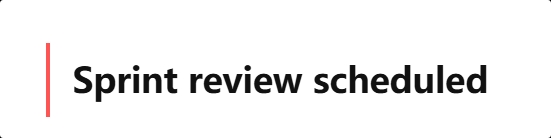
<div style="
  font-size: 23px;
  font-weight: 600;
  color: #111;
  padding: 10px 0 10px 15px;
  border-left: 3px solid #ff5454;
  margin: 1.2em 0;
  font-family: 'Untitled Sans', system-ui, sans-serif;
">Sprint review scheduled</div>
特点:Linear 标志性红、紧凑排版,适合任务/通知类标题。
✅ 使用技巧:
- 所有样式都经过 跨平台字体回退(
system-ui,sans-serif等),确保显示一致。 - 若你的富文本背景是深色,可将文字色改为
#e0e0e0,竖线用亮色(如#4fc3f7)。 - 想批量使用?可提取
border-left-color和font-family做统一主题。
需要我为你 生成一套完整主题(含正文、小标题、引用等),或导出为 CSS 类(供支持 <style> 的平台使用)?欢迎继续提!
标题样式
✅ 方案一:渐变文字 + 大字号(现代感强)

<div style="
  font-size: 28px;
  font-weight: 600;
  font-family: 'Segoe UI', system-ui, sans-serif;
  background: linear-gradient(90deg, #00dbde, #fc00ff);
  -webkit-background-clip: text;
  background-clip: text;
  color: transparent;
  margin: 1.2em 0;
">智能引擎启动</div>
💡 字号
28px相当于<h3>~`
的视觉大小,可根据需要调整为24px、32px` 等。
霓虹发光 + 大字号

<div style="
  font-size: 30px;
  font-weight: bold;
  font-family: monospace;
  color: #0af;
  text-shadow:
    0 0 6px #0af,
    0 0 12px rgba(0, 170, 255, 0.6);
  margin: 1.2em 0;
">量子计算就绪</div>
✅ 优势:不依赖
background-clip,在几乎所有富文本编辑器中都能正常显示。
✅ 方案三:简洁冷色调 + 大字号(低调科技风)

<div style="
  font-size: 26px;
  font-weight: 600;
  color: #a0e7ff;
  font-family: 'Helvetica Neue', Arial, sans-serif;
  letter-spacing: 1px;
  margin: 1.2em 0;
">神经网络激活</div>
浅灰背景 · 办公友好

<div style="
  font-size: 24px;
  font-weight: 600;
  color: #2d3748;
  background: #f8fafc;
  padding: 12px 16px 12px 14px;
  border-left: 3px solid #4fd1c5;
  margin: 1.2em 0;
  font-family: 'Helvetica Neue', Arial, sans-serif;
">模型训练成功</div>
窄边 · 极致简约

<div style="
  font-size: 22px;
  font-weight: 500;
  color: #4a5568;
  padding-left: 12px;
  border-left: 2px solid #a0aec0;
  margin: 1em 0;
  font-family: system-ui, sans-serif;
">日志分析完毕</div>
赛博紫 · 未来感

<div style="
  font-size: 26px;
  font-weight: 700;
  color: #e6d7ff;
  padding-left: 16px;
  border-left: 4px solid #9d4edd;
  margin: 1.2em 0;
  font-family: 'Arial', sans-serif;
">量子通道开启</div>
配套样式
完整主题代码
- 主标题(带左侧竖线)
- 小标题(次级标题)
- 正文段落
- 引用块(blockquote 风格)
- 代码片段(行内 & 块级)
- 列表(有序 / 无序)
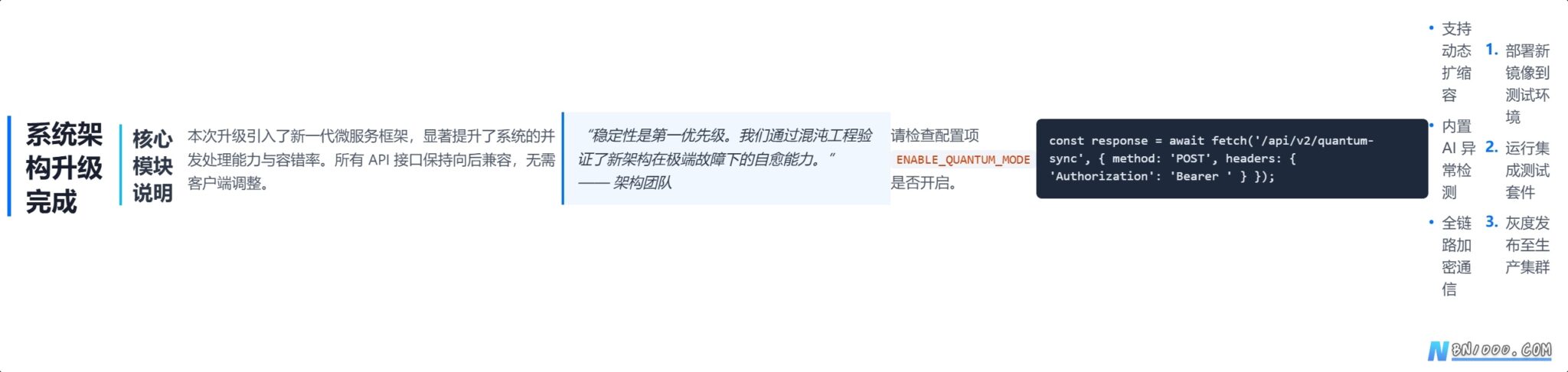
<!-- 主标题 -->
<div style="
  font-size: 28px;
  font-weight: 700;
  color: #1a1f2f;
  padding-left: 16px;
  border-left: 4px solid #0072ff;
  margin: 1.8em 0 1.2em 0;
  font-family: 'Segoe UI', system-ui, -apple-system, sans-serif;
  line-height: 1.3;
">系统架构升级完成</div>

<!-- 小标题 -->
<div style="
  font-size: 22px;
  font-weight: 600;
  color: #2d3748;
  padding-left: 12px;
  border-left: 3px solid #00c3ff;
  margin: 1.4em 0 0.8em 0;
  font-family: inherit;
">核心模块说明</div>

<!-- 正文段落 -->
<p style="
  font-size: 16px;
  line-height: 1.6;
  color: #4a5568;
  margin: 0.8em 0;
  font-family: 'Segoe UI', system-ui, sans-serif;
">本次升级引入了新一代微服务框架,显著提升了系统的并发处理能力与容错率。所有 API 接口保持向后兼容,无需客户端调整。</p>

<!-- 引用块 -->
<div style="
  font-size: 16px;
  line-height: 1.6;
  color: #2d3748;
  background: #f0f7ff;
  border-left: 3px solid #0072ff;
  padding: 12px 16px 12px 14px;
  margin: 1.2em 0;
  font-style: italic;
">“稳定性是第一优先级。我们通过混沌工程验证了新架构在极端故障下的自愈能力。” —— 架构团队</div>

<!-- 行内代码 -->
<p style="
  font-size: 16px;
  line-height: 1.6;
  color: #4a5568;
  margin: 0.8em 0;
  font-family: inherit;
">请检查配置项 <span style="
  font-family: 'SFMono-Regular', Consolas, monospace;
  background: #f1f5f9;
  padding: 2px 6px;
  border-radius: 4px;
  color: #d63900;
  font-size: 14px;
">ENABLE_QUANTUM_MODE</span> 是否开启。</p>

<!-- 代码块 -->
<div style="
  font-family: 'SFMono-Regular', Consolas, monospace;
  font-size: 14px;
  line-height: 1.4;
  background: #1e293b;
  color: #e2e8f0;
  padding: 14px;
  border-radius: 6px;
  margin: 1.2em 0;
  overflow-x: auto;
">const response = await fetch('/api/v2/quantum-sync', {
  method: 'POST',
  headers: { 'Authorization': 'Bearer <TOKEN>' }
});</div>

<!-- 无序列表 -->
<div style="margin: 1em 0;">
  <div style="display: flex; align-items: flex-start; margin: 0.6em 0;">
    <span style="color: #0072ff; margin-right: 8px;">•</span>
    <span style="color: #4a5568; font-size: 16px; line-height: 1.5;">支持动态扩缩容</span>
  </div>
  <div style="display: flex; align-items: flex-start; margin: 0.6em 0;">
    <span style="color: #0072ff; margin-right: 8px;">•</span>
    <span style="color: #4a5568; font-size: 16px; line-height: 1.5;">内置 AI 异常检测</span>
  </div>
  <div style="display: flex; align-items: flex-start; margin: 0.6em 0;">
    <span style="color: #0072ff; margin-right: 8px;">•</span>
    <span style="color: #4a5568; font-size: 16px; line-height: 1.5;">全链路加密通信</span>
  </div>
</div>

<!-- 有序列表 -->
<div style="margin: 1.2em 0;">
  <div style="display: flex; align-items: flex-start; margin: 0.6em 0;">
    <span style="color: #0072ff; font-weight: bold; margin-right: 8px;">1.</span>
    <span style="color: #4a5568; font-size: 16px; line-height: 1.5;">部署新镜像到测试环境</span>
  </div>
  <div style="display: flex; align-items: flex-start; margin: 0.6em 0;">
    <span style="color: #0072ff; font-weight: bold; margin-right: 8px;">2.</span>
    <span style="color: #4a5568; font-size: 16px; line-height: 1.5;">运行集成测试套件</span>
  </div>
  <div style="display: flex; align-items: flex-start; margin: 0.6em 0;">
    <span style="color: #0072ff; font-weight: bold; margin-right: 8px;">3.</span>
    <span style="color: #4a5568; font-size: 16px; line-height: 1.5;">灰度发布至生产集群</span>
  </div>
</div>
深色背景适配建议(如 Notion 暗色模式、终端文档)
若你的富文本区域是深色背景(如 #121212 或 #1e1e1e),只需替换以下颜色变量:
| 元素 | 浅色版 | 深色版 |
|---|---|---|
| 主标题文字 | #1a1f2f → | #e6f0ff |
| 小标题文字 | #2d3748 → | #cbdfff |
| 正文文字 | #4a5568 → | #a0b0cc |
| 引用背景 | #f0f7ff → | #1a2233 |
| 引用文字 | #2d3748 → | #cbdfff |
| 行内代码背景 | #f1f5f9 → | #2d3748 |
| 行内代码文字 | #d63900 → | #ff9e6d |
使用提示:
- 所有样式都写在
style=""内联属性中,可直接粘贴到富文本 HTML 模式。 - 避免使用
<h1>~`,完全用或` 控制。 - 如果平台会自动加
<p>,你也可以只写文字+内联样式, - 例如:
<span style="font-size: 28px; font-weight: 600; color: #0ff; text-shadow: 0 0 8px #0ff;">核心系统上线</span>
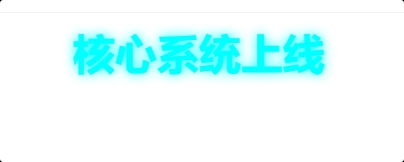
需要更小/更大的字号、或特定配色(如深空黑、赛博紫等)?我可以继续优化!
© 版权声明
THE END
![实用工具丨FileZilla——FTP连接工具[应用技巧]-本牛千智丨专注WorkFine开发](https://www.bn1000.com/wp-content/uploads/2025/09/20250905164356509-FileZilla技巧.jpeg)